

Microsoft Flight Simulator Sim Update 3 Beta has finally arrived, bringing a comprehensive overhaul to the game's control system that many virtual pilots have been eagerly awaiting. The beta introduces version 1.5.1.0, which particularly focuses on addressing persistent input lag issues and improving controller calibration for a more responsive flying experience. Additionally, this update includes a significant yet undocumented feature – local content downloads. While not mentioned in the official patch notes, the MSFS beta now allows users to install default aircraft and airports locally instead of streaming them.
Major Controls Overhaul
Microsoft has officially released the Sim Update 3 Beta, version 1.5.1.0, bringing a substantial overhaul to the flight simulator's control interface and responsiveness. The 3.6 GB update introduces numerous improvements aimed at addressing longstanding issues reported by virtual pilots since launch. The most notable change in SU3 Beta is the redesigned control mapping interface. Users who previously struggled with the cumbersome controls menu will find significant improvements in navigation speed and organization. The update has fixed excessive load times previously experienced when switching between control options.

A powerful new import/export functionality allows pilots to save and share control configurations through XML files. This feature enables users to:
- Create distinct presets for different controller types
- Export configurations with custom naming conventions
- Import previously saved profiles across installations
However, some users have noted that deleting or duplicating presets can sometimes cause confusion in the interface, requiring a complete restart to properly refresh the system.
Fixes for Input Lag and Controller Calibration
The Sim Update 3 Beta directly addresses one of the most persistent complaints – control input lag. Previously, many pilots reported a half-second delay between physical inputs and on-screen response, making precise maneuvers difficult, especially during critical phases like landing. Consequently, Microsoft has reworked how control inputs are processed, aiming to match the responsiveness found in competing simulators and FAA-approved training devices. The update also tackles issues with controller calibration, particularly focusing on making the movement of in-cockpit yokes match physical controllers more accurately. Before this update, users with devices like the Fulcrum One and Honeycomb yokes often noticed discrepancies between their physical inputs and what appeared on screen. Many had resorted to hiding in-cockpit controls, which particularly damaged immersion for VR users.
Sim Update 3 Quietly Enables Local Content Downloads
While major control improvements take center stage in the Sim Update 3 Beta, the beta version discreetly introduces a long-requested capability that marks a significant shift in how Microsoft Flight Simulator 2024 handles content delivery. The Beta now enables you to download and install core assets directly to your local machine. This fundamental change allows simmers to store:
- Default aircraft and liveries
- Airport facilities and terminals
- World updates and regional content
- Base content (approximately 217GB)
- AI traffic systems
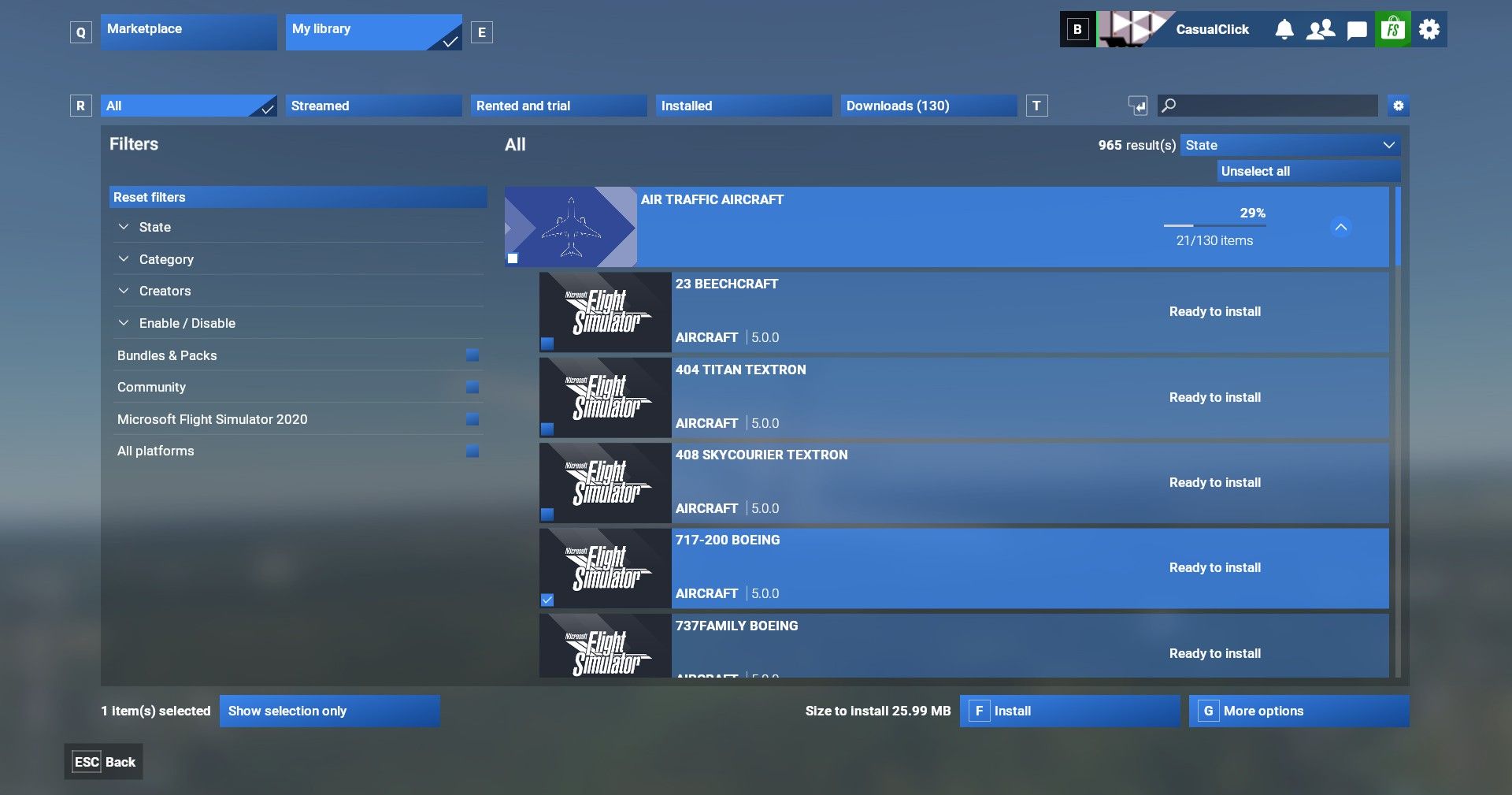
For many users, this addresses a major limitation of the sim's initial release. After installation, users on the official forums noticed that "terminal buildings look way more detailed even from a distance" and "everything was there immediately in high detail" when loading into airports. Microsoft and Asobo developers confirmed the feature is "not listed because it's still unfinished", explaining its absence from official documentation.
Why Local Downloads Matter
The ability to download content locally represents a crucial advancement for the Microsoft Flight Simulator Sim Update 3 Beta, addressing fundamental issues that have plagued many users since launch. This feature tackles several key problems that significantly impacted player experience. Unfortunately, the streaming-focused approach of MSFS 2024 created substantial barriers for players with limited internet access. Users reported initial loading times stretching up to 10-15 minutes, with many experiencing frustrating delays stuck at "5% Loading Language" for nearly 7 minutes.
Prior to MSFS 2024, the previous iteration handled content differently. Microsoft Flight Simulator 2020 primarily utilized local installations, making it accessible for users with unreliable internet connections. Unlike the current version's initial streaming-only approach, MSFS 2020 stored core assets on users' machines, reducing dependency on constant high-speed connectivity.
Notably, local content storage delivers tangible performance improvements beyond just solving connectivity issues:
- Reduced load times from 14 minutes to just 3 minutes in some cases
- Decreased stuttering when approaching detailed areas like cities
- Elimination of blurry textures that gradually improve over time
- Smoother experience with high-detail aircraft that previously required downloading 1.4 GB during flight
Indeed, many users identified a direct correlation between data streaming spikes and in-game stutters.
Conclusion
The comprehensive controls overhaul directly addresses longstanding issues that frustrated virtual pilots since launch. The redesigned interface, coupled with smoother joystick and yoke responses, fundamentally transforms the simulation experience from sluggish to responsive. Perhaps equally important, though initially undocumented, the local content download capability marks a major philosophical shift. This feature essentially solves critical problems for users with limited connectivity while simultaneously reducing stutters and improving load times across all systems.
Overall, Sim Update 3 Beta signals a positive direction for Microsoft Flight Simulator 2024. Although still in beta, these technical improvements lay groundwork for a more accessible, responsive, and enjoyable simulation platform that better serves all types of virtual pilots.